Transform Terraform Plans Into Readable Reports
Stop drowning in verbose plan output. Generate structured Markdown reports that render perfectly in PR comments.
The Pull Request Review Problem
Reviewing Terraform changes in PRs is painful with raw plan output
# azurerm_network_security_rule.security_rule[2] will be created
+ resource "azurerm_network_security_rule" "rule" {
  + access                     = "Allow"
  + destination_address_prefix = "10.0.0.0/8"
  + destination_port_range     = "22"
  + direction                  = "Inbound"
  + name                       = "ssh_from_corporate"
  + priority                   = 100
  + protocol                   = "Tcp"
  + source_address_prefix      = "10.0.0.0/8"
  + source_port_range          = "*"
  + resource_group_name        = "rg-network"
  + network_security_group_name = "nsg-prod"
  }

# azurerm_network_security_rule.security_rule[3] will be created
+ resource "azurerm_network_security_rule" "rule" {
  + access                     = "Deny"
  + destination_address_prefix = "*"
  + destination_port_range     = "3389"
...- Wall of Text
Raw plan output is overwhelming and difficult to scan
- Lost Context
Hard to understand what's actually changing and why
- Mental Mapping
Constantly mapping resource IDs to names in your head
- Cryptic Diffs
Index changes instead of semantic "what actually changed"
tfplan2md Solves This
- Security Changes as Readable Tables
Firewall and NSG rules rendered with protocols, ports, and actions
- Unified Security & Plan Report
Combines Terraform changes with security findings from Checkov, TfLint, and Trivy in one view
- Friendly Names, Not GUIDs
Principal IDs, role names, and scopes resolved to readable text
- Inline Diffs for Large Values
Shows computed diffs for large values like JSON policies or scripts
- Optimized for PR Comments
Designed and tested for GitHub and Azure DevOps rendering
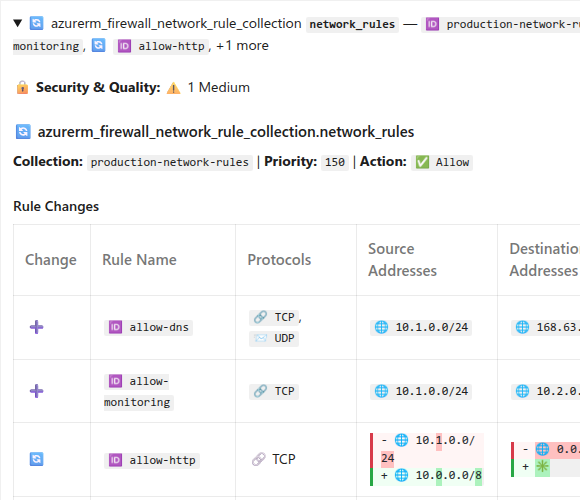
Click to enlarge
Get Started in Seconds
Run one command to convert your Terraform plan
terraform show -json plan.tfplan | docker run -i oocx/tfplan2md
Powerful Features
Everything you need for better Terraform PR reviews

Inline Diffs
Side-by-side "Before" and "After" values with inline highlighting show exactly what changed.
Learn more →
Firewall Rules
Azure Firewall network and application rule collections rendered as readable tables with protocols, ports, FQDNs, and actions.
Learn more →
NSG Rules
Network Security Group rules as readable tables, making security changes easy to audit.
Learn more →
Resource Grouping
Related resources stay grouped together with inline child tables for memberships, subnets, routes, and rules.
Learn more →
Role Assignments
Resolves cryptic Principal IDs, role names, scopes, and Azure AD Groups, Service Principals, and App Roles to human-readable names.
Learn more →
Large Values
Multi-line values like JSON policies show computed diffs with inline highlighting.
Learn more →
Static Code Analysis
Integrates security findings from Checkov, TfLint, and Trivy, mapping them to specific resources.
Learn more →
PR Optimized
Designed and tested for rendering in markdown pull requests on Azure DevOps & GitHub.
Learn more →
Friendly Names
Displays friendly names for resources instead of complex resource ID strings.
Learn more →Perfect for CI/CD
Integrate tfplan2md into your GitHub Actions, Azure Pipelines, or GitLab CI workflow. Automatically post plan reports as PR comments.
View Integration Guides- name: Generate markdown report
run: |
terraform show -json plan.tfplan | \
docker run -i oocx/tfplan2md > plan.md
- name: Post PR comment
uses: actions/github-script@v7
with:
script: |
const fs = require('fs');
const plan = fs.readFileSync('plan.md', 'utf8');
github.rest.issues.createComment({
issue_number: context.issue.number,
owner: context.repo.owner,
repo: context.repo.repo,
body: plan
});trigger: none
pr:
branches:
include:
- main
paths:
include:
- terraform/*
pool:
vmImage: 'ubuntu-latest'
steps:
- task: TerraformInstaller@1
inputs:
terraformVersion: '1.9.0'
- script: terraform init
displayName: 'Terraform Init'
workingDirectory: terraform
- script: terraform plan -out=plan.tfplan
displayName: 'Terraform Plan'
workingDirectory: terraform
- script: terraform show -json plan.tfplan > plan.json
displayName: 'Convert to JSON'
workingDirectory: terraform
- script: |
docker run -v $(pwd):/data oocx/tfplan2md \
/data/plan.json --output /data/plan.md
displayName: 'Generate markdown report'
workingDirectory: terraform
- bash: |
MARKDOWN=$(cat terraform/plan.md)
URL="$(System.TeamFoundationCollectionUri)$(System.TeamProject)/_apis/git/repositories/$(Build.Repository.ID)/pullRequests/$(System.PullRequest.PullRequestId)/threads?api-version=7.0"
BODY=$(jq -n \
--arg content "$MARKDOWN" \
'{comments: [{content: $content, commentType: 1}], status: 1}')
curl -X POST "$URL" \
-H "Content-Type: application/json" \
-H "Authorization: Bearer $(System.AccessToken)" \
-d "$BODY"
displayName: 'Post PR comment'- name: Run security scans
run: |
# Run Checkov
checkov -d terraform --framework terraform \
--output sarif --output-file-path . --compact
# Run TfLint
cd terraform && tflint --format sarif > ../tflint.sarif && cd ..
# Run Trivy
trivy config terraform --format sarif --output trivy.sarif
- name: Generate unified report
run: |
terraform show -json plan.tfplan | \
docker run -i -v $(pwd):/data oocx/tfplan2md \
--code-analysis-results "/data/**/*.sarif" > plan.md
- name: Post PR comment
uses: actions/github-script@v7
with:
script: |
const fs = require('fs');
const plan = fs.readFileSync('plan.md', 'utf8');
github.rest.issues.createComment({
issue_number: context.issue.number,
owner: context.repo.owner,
repo: context.repo.repo,
body: plan
});